
100% Offline Local-First Windows Accounting
Sovereign accounting and inventory for Windows.
A fast, 100% offline desktop billing, accounting, inventory, and payroll suite for small and medium businesses. Zero cloud dependency, zero subscription hostage.
Integrated Capabilities
Built in, working together on your local PC
GST Invoicing & Bill Printing
Create compliant B2B tax invoices and B2C retail bills with HSN auto-lookup, e-Way bill fields, custom terms, and barcode labels.
Full Double-Entry Accounting
Automated journal entries, real-time balance sheet, profit & loss statement, trial balance, and general ledger reports.
Purchasing & Vendor Bills
Purchase orders, goods receipt verification, vendor debit/credit notes, payment tracking, and supplier outstanding aging.
Multi-Warehouse Inventory
Stock tracking across multiple depots, batch/serial tracking, low-stock threshold alerts, and automated FIFO valuation.
Integrated Payroll & Staff
Employee master directory, daily attendance tracking, automated salary slips, PF/ESI deductions, and advance payment ledgers.
Banking & Cash Drawer Ledgers
Manage multiple bank accounts, cash drawers, contra fund transfers, and monthly bank reconciliation statements.
Customer Khata & Credit Limits
Customer credit terms, payment reminders, outstanding ledger balance summaries, and statement export in Excel and PDF.
Thermal & Laser Print Engines
Built-in templates for 2-inch and 3-inch thermal POS receipt rolls, as well as full A4/A5 formal tax invoices.
100% Offline Local PC Storage
All your financial ledgers and client data live on your computer in an embedded SQLite engine with zero cloud subscription fees.
Live Visual Explorer
Inspect the Finora v2.0 desktop interface
Switch between core views below to examine the executive dashboard, GST invoicing screen, purchase manager, payroll, and financial reports.
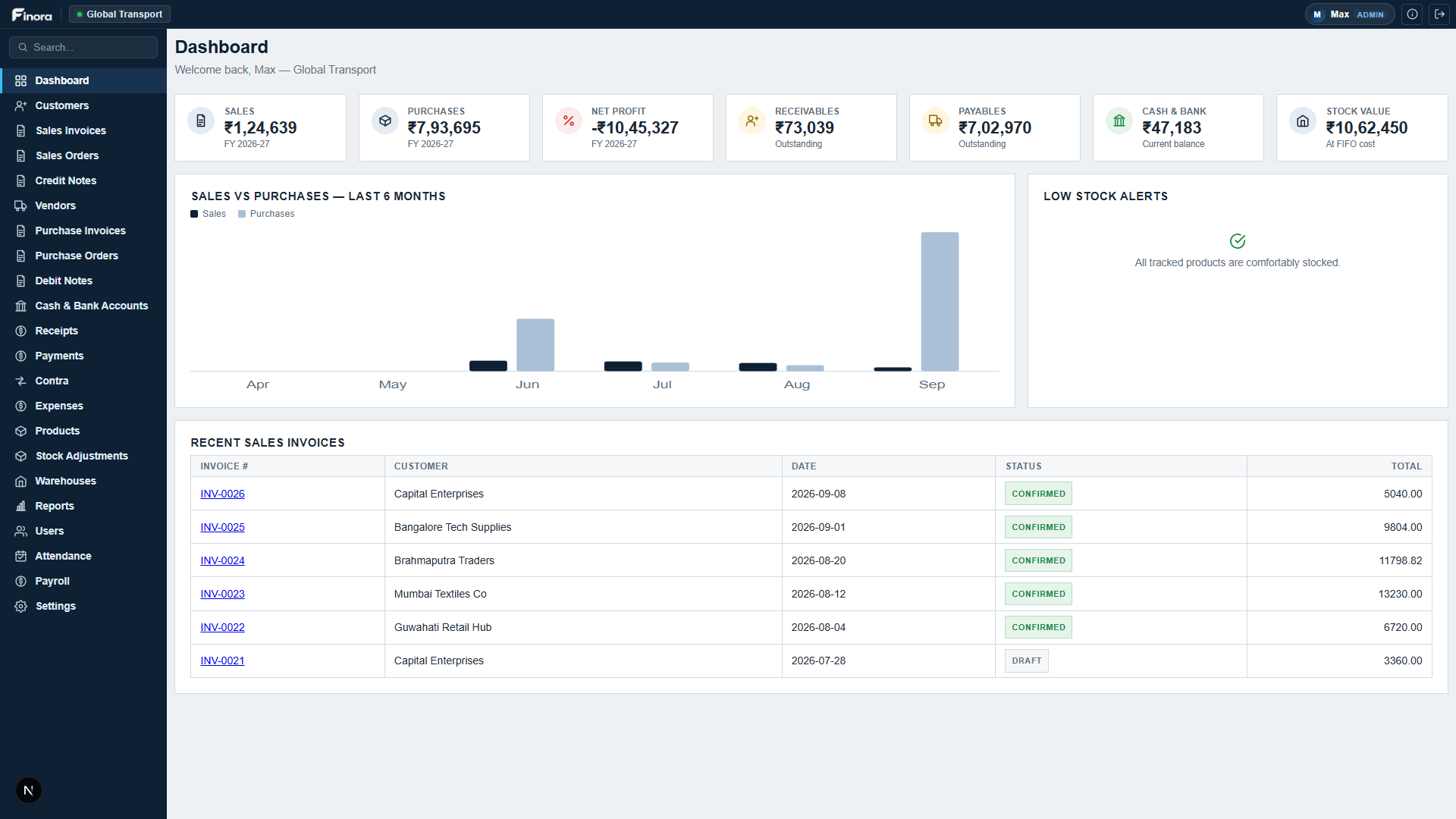
Executive Dashboard
Real-time overview of cash in hand, bank balances, receivables, payables, and sales trends.
Desktop & Peripheral Bridge
Connects natively with your PC and counter equipment
100% Offline SQLite Core
High-speed embedded database running entirely locally. Works during complete internet outages with zero lag.
ESC/POS Thermal & Laser
Direct driver support for all 58mm/80mm thermal receipt printers, desktop laser printers, and barcode sticker printers.
Barcode Scanner Integration
Instant USB/wireless scanner support for fast POS checkout and physical stock count adjustments.
Excel & JSON Portability
Export clean GSTR-1, GSTR-3B, ledger summaries, and product catalogs to Excel, CSV, or formatted PDF.
Local Privacy
100% private, sovereign data architecture
100% Local PC Sovereignty
Your accounts, customer lists, and financial figures are never transmitted to cloud servers or third parties.
Encrypted Local Database
Protected against accidental corruption with local cryptographic checksums and atomic write commits.
One-Click Offline Backup
Create complete encrypted database snapshots on local drives or external USB flash drives in one click.
Measured Performance
Built for reliable, daily accounting without cloud latency
Offline operation with zero dependency on internet or remote cloud servers
Local query response latency for instantaneous ledger filtering and search
Monthly subscription fees, renewal locks, or proprietary cloud lock-in
Integrated functional accounting, inventory, and payroll modules built-in
Frequently Asked Questions
- Does Finora require an active internet connection?
- No. Finora is 100% offline software. Your data is stored locally in an embedded database on your own computer, so you can invoice, view stock, and run reports without internet.
- Can Finora handle GST billing and statutory return filing in India?
- Yes. Finora handles CGST, SGST, and IGST computations, tax invoices, debit/credit notes, reverse charge, and exports data ready for GSTR-1 and GSTR-3B filing.
- What hardware does Finora support?
- Finora connects seamlessly with all standard ESC/POS 2-inch (58mm) and 3-inch (80mm) thermal printers, standard laser/inkjet A4 printers, and USB barcode scanners.
- How can I back up my accounting data?
- Finora includes a single-click backup feature in Settings that exports your entire database into a standalone backup file that you can save to a USB drive or local disk.
Download Finora for Windows
Signed executable installer. Compatible with Windows 10 and 11 (64-bit).
Windows Installer
Official setup wizard. Installs Finora directly to your PC and creates desktop shortcuts.
Installer (.exe)Accounting Consultation
Consult with our financial software team regarding multi-company ledgers and chart of accounts.
Schedule CallData Migration
One-click import tools for bringing existing inventory, customer contacts, and supplier books from Excel.
Get AssistanceFor support with thermal printers, barcode scanners, or multi-PC LAN networking, contact contact@bigsur.in.